调试方法论
- 安装gdb
sudo apt-get install gdb - 查找出错的文件
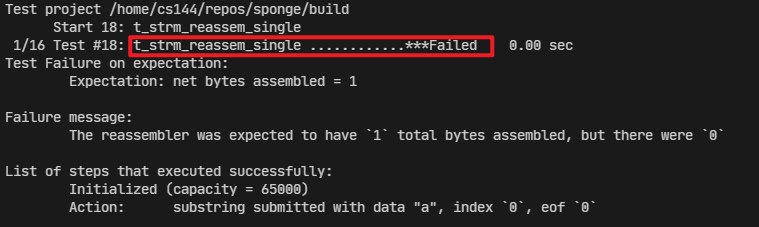
make_lab1 命令输出中,发现 t_strm_reassem_single 测试执行出错。
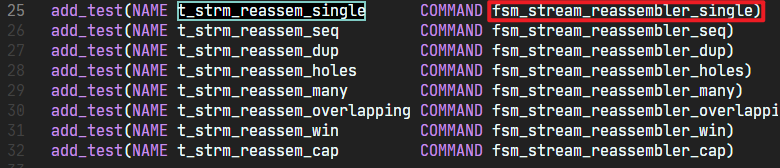
在 /etc/tests.cmake 文件中,发现该测试执行的文件是 /build/tests/fsm_stream_reassembler_single,因此在下面的配置文件中,将调试的文件设置为该文件。
 3. 配置 vscode launch.json
{
    // Use IntelliSense to learn about possible attributes.
    // Hover to view descriptions of existing attributes.
    // For more information, visit: https://go.microsoft.com/fwlink/?linkid=830387
    "version": "0.2.0",
    "configurations": [
        {
            "name": "sponge debug",
            "type": "cppdbg",
            "request": "launch",
            // "program": "${workspaceFolder}/build/tests/${fileBasenameNoExtension}",
            "program": "${workspaceFolder}/build/tests/fsm_stream_reassembler_single", // 修改为需要测试的文件
            "args": [],
            "stopAtEntry": false,
            "cwd": "${workspaceFolder}", // 修改
            "environment": [],
            "externalConsole": false,
            "MIMode": "gdb",
            "setupCommands": [
                {
                    "description": "Enable pretty-printing for gdb",
                    "text": "-enable-pretty-printing",
                    "ignoreFailures": true
                }
            ],
            "miDebuggerPath": "/usr/bin/gdb" // 添加gdb
        }
    ]
}